
|
Training, Open Source Programming Languages |
| Home | Accessibility | Courses | The Mouth | Resources | Site Map | About Us | Contact |
| For 2023 (and 2024 ...) - we are now fully retired from IT training. We have made many, many friends over 25 years of teaching about Python, Tcl, Perl, PHP, Lua, Java, C and C++ - and MySQL, Linux and Solaris/SunOS too. Our training notes are now very much out of date, but due to upward compatability most of our examples remain operational and even relevant ad you are welcome to make us if them "as seen" and at your own risk. Lisa and I (Graham) now live in what was our training centre in Melksham - happy to meet with former delegates here - but do check ahead before coming round. We are far from inactive - rather, enjoying the times that we are retired but still healthy enough in mind and body to be active! I am also active in many other area and still look after a lot of web sites - you can find an index ((here)) |
|
Notes from the white board
I come up with my best presentations in front of a class. There's nothing like having the adrennalin flowing to fine tune the way some information is got across, and nothing as good as an inquisitive group of delegate to inspire a new approach. So I end up with some notes on the whiteboard that I REALLY don't want to loose. These days, I'm using my digital camera to record off the board. Yes, really. It's the best way, for me, to do it. Have you seen those whiteboards that record onto a sheet of paper, about A4 size, off a roll? Yes - I have too, and usually they're sitting in the corner gathering dust in a crusty conference room or just being used, not plugged in, as an expensive shite board. Have you seen those project-and-mark-over PC based systems that let you save you screen? Yes, but they can be awkward to use and you have to be writing / drawing on a designated, lower resolution, area. Thus - the 7.1 Megapixel camera. But there's no 'perfect' way of recording the board. Ideally, a button pressed would record the board in a manual-quality set of diagrams, with words OCR'd too. My camera has compromised too. 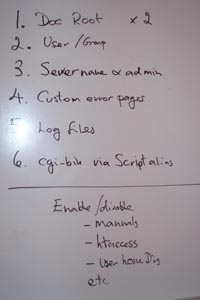 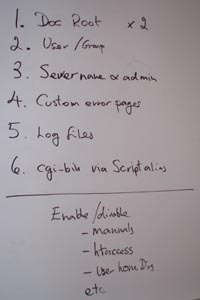 Both of these diagrams are readable (just, but then I HAVE squashed them more than I usually would), but the one on the left is flashy and the one on the right is distorted. Personal choice - I'll stand slightly to one side as I take the picture and that'll prevent the flash bounce. If need be, Photoshop could be used to clean up. Or - as in the case in point here - I can simply use the picture as the basis for typed documentation later ... here goes: Setting up a web server - critical task excercise 1. Change the DocumentRoot - where the web site home is located - in 2 places in the configuration file. You really don't want the web site data to remain in the same area as the server software 2. Change the User and Group. There are security issues if you leave the user as nobody and the group as -1, especially if your web server is also a file server with somethng like NFS 3. Change the server name and the administrator's email address. Ensures that directories requested without a trailing /, and redirects, work correctly. Also that standard error pages give an appropriate email address for users to contact 4. Set up the error pages. You want to present your user with a professional "page not found" and not the minimal, standard one. 5. Change the log file format to "combined". It's worth adding extra information to your server logs if you're going to actively monitor traffic to your site and want to make best use of the available marketing and search engine information it can provide 6. If you want to run Perl or Python via CGI, turn it on Server side programs are off by default - a good decision as it's a facility you really want to consider carefully before offering Other things to consider early in the configuration a) Disable the Apache httpd manual pages?? b) Allow users to override default server settings in httpd.conf via a .htaccess file ?? c) Allow each user to have their own home directory in the form ~username ?? Further notes from the Whitebaord I also made notes yesterday, via the whiteboard, on the file system structure of Linux and of httpd ... now documented in our solutions centre (written 2006-12-14) Associated topics are indexed as below, or enter http://melksh.am/nnnn for individual articles G504 - Well House Consultants - Writing Notes[4] Seeing the wood for the trees. - (2004-08-06) [7] Writing on a Sunday - (2004-08-08) [9] Study room - the Oxford train - (2004-08-10) [394] A year on - should we offer certified PHP courses - (2005-07-28) [398] Training course material - why we write our own - (2005-07-30) [407] Theft of training material - (2005-08-09) [797] Writing up new C / C++ notes. - (2006-07-09) [979] Empty seats, Nodding Donkeys and buses - (2006-12-11) [1950] Copyright of Training Notes and Web Site - (2008-12-18) [2010] How long should a training module be? - (2009-01-27) [2192] Copy writing - allowing for the cut - (2009-05-21) [2414] Hello World - a good traditional start to a Java course - (2009-09-22) [2481] Sample code with errors in it on our web site - (2009-10-29) [2812] What is Perl? - (2010-06-15) [2828] Sharing our programs - easy. Sharing our data - harder. - (2010-06-26) [3152] Jargon busting - (2011-01-30) [4009] Clear, concise examples - Ruby classes and objects. - (2013-02-17) [4031] Showing what programming errors look like - web site pitfall - (2013-03-06) A602 - Web Application Deployment - Apache httpd - Sourcing, Installation, Testing [523] Apache httpd release 2.2 - (2005-12-10) [526] Apache httpd - serving web documents from different directories - (2005-12-12) [550] 2006 - Making business a pleasure - (2006-01-01) [660] Stopping and restarting Apache httpd cleanly - (2006-03-29) [907] Browser -> httpd -> Tomcat -> MySQL. Restarting. - (2006-10-28) [1095] Apache httpd , browser, MySQL and MySQL client downloads - (2007-02-28) [1292] DHCP automatic IP address v Static IP - (2007-08-06) [1449] Upgrade Mac OSX to Leopard, Web Server Apache httpd config lost - (2007-11-29) [1455] Connecting to MySQL 5 from PHP on Mac OSX Leopard - (2007-12-03) [1707] Configuring Apache httpd - (2008-07-12) [1731] Apache httpd, MySQL, PHP - installation procedure - (2008-08-01) [1768] What is built in to this httpd and PHP? - (2008-08-23) [1945] Summary - Apache httpd build on Linux - (2008-12-14) [2080] Using ApacheBench and jconsole to test and monitor Tomcat - (2009-03-14) [2096] Where is my new Apache httpd installed - (2009-03-22) [2184] Choosing the right version of Java and Tomcat - (2009-05-16) [2520] Global and Enable - two misused words! - (2009-11-30) [3426] Automed web site testing scripted in Ruby using watir-webdriver - (2011-09-09) [4437] Adding a PHP build option, rotating an image based on camera data, and a new look at thumbnails in PHP - (2015-02-22)
Some other Articles
puts - opposite of chomp in RubyEquality in Ruby - == eql? and equal? Cardinal numbers and magic numbers Blessing in Perl / Member variable in Ruby Notes from the white board Finalist reception - Wiltshire Business of the Year Street Scene Wellhouse Manor, Hotel, Melksham Melksham and Norwich |
4759 posts, page by page
Link to page ... 1, 2, 3, 4, 5, 6, 7, 8, 9, 10, 11, 12, 13, 14, 15, 16, 17, 18, 19, 20, 21, 22, 23, 24, 25, 26, 27, 28, 29, 30, 31, 32, 33, 34, 35, 36, 37, 38, 39, 40, 41, 42, 43, 44, 45, 46, 47, 48, 49, 50, 51, 52, 53, 54, 55, 56, 57, 58, 59, 60, 61, 62, 63, 64, 65, 66, 67, 68, 69, 70, 71, 72, 73, 74, 75, 76, 77, 78, 79, 80, 81, 82, 83, 84, 85, 86, 87, 88, 89, 90, 91, 92, 93, 94, 95, 96 at 50 posts per pageThis is a page archived from The Horse's Mouth at http://www.wellho.net/horse/ - the diary and writings of Graham Ellis. Every attempt was made to provide current information at the time the page was written, but things do move forward in our business - new software releases, price changes, new techniques. Please check back via our main site for current courses, prices, versions, etc - any mention of a price in "The Horse's Mouth" cannot be taken as an offer to supply at that price.
Link to Ezine home page (for reading).
Link to Blogging home page (to add comments).
PH: 01144 1225 708225 • EMAIL: info@wellho.net • WEB: http://www.wellho.net • SKYPE: wellho
PAGE: http://www.wellho.net/mouth/982_Note ... board.html • PAGE BUILT: Sun Oct 11 16:07:41 2020 • BUILD SYSTEM: JelliaJamb