
|
Training, Open Source Programming Languages |
| Home | Accessibility | Courses | The Mouth | Resources | Site Map | About Us | Contact |
| For 2023 (and 2024 ...) - we are now fully retired from IT training. We have made many, many friends over 25 years of teaching about Python, Tcl, Perl, PHP, Lua, Java, C and C++ - and MySQL, Linux and Solaris/SunOS too. Our training notes are now very much out of date, but due to upward compatability most of our examples remain operational and even relevant ad you are welcome to make us if them "as seen" and at your own risk. Lisa and I (Graham) now live in what was our training centre in Melksham - happy to meet with former delegates here - but do check ahead before coming round. We are far from inactive - rather, enjoying the times that we are retired but still healthy enough in mind and body to be active! I am also active in many other area and still look after a lot of web sites - you can find an index ((here)) |
|
SQL - Data v Metadata, and the various stages of data selection  MySQL is a system for managing data ... so it's natural for it to manage its own configuration data too in the same way. However, there are a few elements which have to be kept outside those internal tables - such as the data about which port number the daemon is to listen on, and the directory name (file path) for the databases to be stored. MySQL is a system for managing data ... so it's natural for it to manage its own configuration data too in the same way. However, there are a few elements which have to be kept outside those internal tables - such as the data about which port number the daemon is to listen on, and the directory name (file path) for the databases to be stored. There are defaults values built in to each of the MySQL processes which will be used in the absence of any other settings. But they are overridden as follows: • The file /etc/my.cnf - a system wide file that contains settings for MySQL server and client programs for all user accounts • Files ~username/.my.cnf - settings for all server and client programs on a "per user" basis. So there's (potentaiily) a file called .my.cnf in every user's home directory, containing instructions for all client and servers run by that user which will override any conflicing directives in /etc/my.cnf, and defaults. • From the command line - specific MySQL settings can be made for individual processes, irrespective of defaults and overrides in /etc/mt.cnf and ~username/.my.cnf 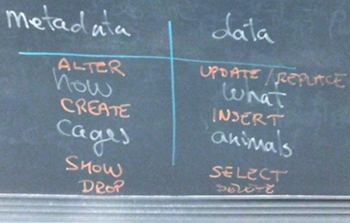 Database engines look after data - and they also look after the structure of how that data is held. That's known as the Metadata. So the metadata is "how" and the data is "what". Database engines look after data - and they also look after the structure of how that data is held. That's known as the Metadata. So the metadata is "how" and the data is "what". The diagram shows the separation between data and metadata. As a comparison on this week's MySQL course, I equated the metadata to the cages and enclosures at a zoo, and the data to the animals themselves. SQL instructions too differ between those that run on the data and metadata ... to look at data, you'll use a SELECT, but to look at metadata, you'll use SHOW. And so it goes on. 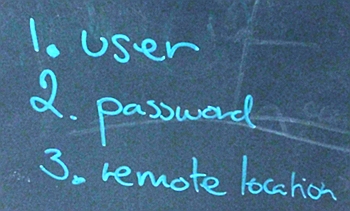 MySQL databases are accessed through logins - unlike web servers which are often open to all (at least at a protocol level), users of MySQL need to establish credentials. Not only is there the traditional user name and password associated with an account (and the authorisation or denial of a request), but there's an additonal layer that can be used with is the remote location from which the connection is being made. MySQL databases are accessed through logins - unlike web servers which are often open to all (at least at a protocol level), users of MySQL need to establish credentials. Not only is there the traditional user name and password associated with an account (and the authorisation or denial of a request), but there's an additonal layer that can be used with is the remote location from which the connection is being made.By using the remote location on database accounts, MySQL can be locked down to respond to requests only from the subnet on which the server islocated, or indeed purely from other processes on the very host on which it is running. Very often these restrictions will be backed up by firewall settings that would (in any case) prevent information on MySQL ports getting diretly to the database server - but of course it's better to have two levels of access control in place than none at all.  Even when I'm running a course during the week, other things are going on too. Early on Thursday morning, I had to drop off some papers in our neighbouring town of Trowbridge. Looking briefly around Trowbridge (and carefully pushing the camera's shutter button when there was no traffic), I marvelled at some of the hidden beauty that there's to see in our area, even in towns which are not renowned for the tourist attraction and great beauty. Even when I'm running a course during the week, other things are going on too. Early on Thursday morning, I had to drop off some papers in our neighbouring town of Trowbridge. Looking briefly around Trowbridge (and carefully pushing the camera's shutter button when there was no traffic), I marvelled at some of the hidden beauty that there's to see in our area, even in towns which are not renowned for the tourist attraction and great beauty. There are quite a few steps from data being extracted from database tables to it being returned to the user who made the SQL request, and each of the steps may be specified by a clause on a SELECT command. There are quite a few steps from data being extracted from database tables to it being returned to the user who made the SQL request, and each of the steps may be specified by a clause on a SELECT command.• Tables are JOINED to link columns in one table to columns in another table - linking rows, if you like. • Records are filtered with a WHERE clause, in which individual records that don't meet required criteria. • If there's a need to link a whole series of rows into a single row, it's done by a GROUP clause. You may require, for example to know how many soldiers are based at a certain barracks rather than all their names! • The HAVING clause allows for further records to be eliminated after they have been grouped - so that (following on from the previous example) we could eliminate all barracks with less than 20 soldiers based there. • the remaining records are now SORTed into order • and finally a LIMIT is applied if required so that only the first / top records are returned. (written 2011-04-29) Associated topics are indexed as below, or enter http://melksh.am/nnnn for individual articles S161 - Data Access and Security in MySQL[192] Current MySQL and PHP paths and upgrades - (2005-01-28) [193] The wrong MySQL - (2005-01-29) [401] What is an SQL injection attack? - (2005-08-02) [535] MySQL permissions and privileges - (2005-12-20) [647] Checking for MySQL errors - (2006-03-15) [947] What is an SQL injection attack? - (2006-11-27) [1131] MySQL - Password security (authentication protocol) - (2007-04-02) [2204] Images in a database? How big is a database? (MySQL) - (2009-05-28) [2263] Mysqldump fails as a cron job - a work around - (2009-06-30) [2647] Removing duplicates from a MySQL table - (2010-02-22) [4390] Checking MySQL database backups have worked (not failed) - (2015-01-10) [4406] Fixing damaged MySQL tables - Error 1712 and Error 2013 - (2015-01-25) [4481] Extracting data from backups to restore selected rows from MySQL tables - (2015-05-01) [4491] Web Server Admin - some of those things that happen, and solutions - (2015-05-10) [4493] Forgotten / lost MySQL root password - (2015-05-16) S157 - More MySQL commands [158] MySQL - LEFT JOIN and RIGHT JOIN, INNER JOIN and OUTER JOIN - (2004-12-20) [159] MySQL - Optimising Selects - (2004-12-21) [279] Getting a list of unique values from a MySQL column - (2005-04-14) [449] Matching in MySQL - (2005-09-24) [494] MySQL - a score of things to remember - (2005-11-12) [502] SELECT in MySQL - choosing the rows you want - (2005-11-22) [513] MySQL - JOIN or WHERE to link tables correctly? - (2005-12-01) [515] MySQL - an FAQ - (2005-12-03) [517] An occasional chance, and reducing data to manageable levels - (2005-12-04) [567] Combining similar rows from a MySQL database select - (2006-01-17) [572] Giving the researcher power over database analysis - (2006-01-22) [581] Saving a MySQL query results to your local disc for Excel - (2006-01-29) [591] Key facts - SQL and MySQL - (2006-02-04) [673] Helicopter views and tartans - (2006-04-06) [1213] MySQL - the order of clauses and the order of actions - (2007-06-01) [1235] Outputting numbers as words - MySQL with Perl or PHP - (2007-06-17) [1331] MySQL joins revisited - (2007-09-03) [1574] Joining MySQL tables revisited - finding nonmatching records, etc - (2008-03-15) [1735] Finding words and work boundaries (MySQL, Perl, PHP) - (2008-08-03) [1904] Ruby, Perl, Linux, MySQL - some training notes - (2008-11-23) [2110] MySQL - looking for records in one table that do NOT correspond to records in another table - (2009-03-31) [2259] Grouping rows for a summary report - MySQL and PHP - (2009-06-27) [2448] MySQL - efficiency and other topics - (2009-10-10) [2643] Relating tables with joins in MySQL - (2010-02-21) [2644] Counting rows in joined MySQL tables - (2010-02-22) [2645] Optimising and caching your MySQL enquiries - (2010-02-22) [3061] Databases - why data is split into separate tables, and how to join them - (2010-11-20) S154 - MySQL - Designing an SQL Database System [59] MySQL - Pivot tables - (2004-09-22) [361] Binary Large Objects or bars - (2005-06-27) [375] Oops - I got my initial database design wrong - (2005-07-12) [666] Database design - get it right from first principles - (2006-04-02) [918] Databases needn't be frightening, hard or expensive - (2006-11-08) [937] Display an image from a MySQL database in a web page via PHP - (2006-11-22) [945] Code quality counts - (2006-11-26) [1423] MySQL - table design and initial testing example - (2007-11-06) [1575] Database design for a shopping application (MySQL) - (2008-03-15) [1771] More HowTo diagrams - MySQL, Tomcat and Java - (2008-08-24) [2053] What a difference a MySQL Index made - (2009-02-25) [2085] MySQL - licensing issues, even with using the name - (2009-03-16) [2749] Delegate Question - defining MySQL table relationships as you create the tables - (2010-05-02) [3361] Blowing our own trumpet - MySQL resources - (2011-07-18) [3494] Databases - when to treat the rules as guidelines - (2011-10-23) [4426] FileMaker Day to Unix Time conversion - (2015-02-15)
Some other Articles
Small scale improvement - big scale gain. And they CAN be done with local knowledgeWanted - a look to the future Melksham Car Parking - current charges and limits The importance of feedback SQL - Data v Metadata, and the various stages of data selection Files or Databases? MySQL, SQLite, or Oracle? Baby Pictures Reybridge, Easter Monday Easter on the Canal - near Melksham, Wiltshire Alternative Vote (AV) - cutting the crap |
4759 posts, page by page
Link to page ... 1, 2, 3, 4, 5, 6, 7, 8, 9, 10, 11, 12, 13, 14, 15, 16, 17, 18, 19, 20, 21, 22, 23, 24, 25, 26, 27, 28, 29, 30, 31, 32, 33, 34, 35, 36, 37, 38, 39, 40, 41, 42, 43, 44, 45, 46, 47, 48, 49, 50, 51, 52, 53, 54, 55, 56, 57, 58, 59, 60, 61, 62, 63, 64, 65, 66, 67, 68, 69, 70, 71, 72, 73, 74, 75, 76, 77, 78, 79, 80, 81, 82, 83, 84, 85, 86, 87, 88, 89, 90, 91, 92, 93, 94, 95, 96 at 50 posts per pageThis is a page archived from The Horse's Mouth at http://www.wellho.net/horse/ - the diary and writings of Graham Ellis. Every attempt was made to provide current information at the time the page was written, but things do move forward in our business - new software releases, price changes, new techniques. Please check back via our main site for current courses, prices, versions, etc - any mention of a price in "The Horse's Mouth" cannot be taken as an offer to supply at that price.
Link to Ezine home page (for reading).
Link to Blogging home page (to add comments).
PH: 01144 1225 708225 • EMAIL: info@wellho.net • WEB: http://www.wellho.net • SKYPE: wellho
PAGE: http://www.wellho.net/mouth/3270_SQL ... ction.html • PAGE BUILT: Sun Oct 11 16:07:41 2020 • BUILD SYSTEM: JelliaJamb