
|
Training, Open Source Programming Languages |
| Home | Accessibility | Courses | The Mouth | Resources | Site Map | About Us | Contact |
| For 2023 (and 2024 ...) - we are now fully retired from IT training. We have made many, many friends over 25 years of teaching about Python, Tcl, Perl, PHP, Lua, Java, C and C++ - and MySQL, Linux and Solaris/SunOS too. Our training notes are now very much out of date, but due to upward compatability most of our examples remain operational and even relevant ad you are welcome to make us if them "as seen" and at your own risk. Lisa and I (Graham) now live in what was our training centre in Melksham - happy to meet with former delegates here - but do check ahead before coming round. We are far from inactive - rather, enjoying the times that we are retired but still healthy enough in mind and body to be active! I am also active in many other area and still look after a lot of web sites - you can find an index ((here)) |
|
How do regular expressions work / Regular Expression diagrams 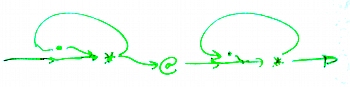 If you want to help yourself work out what a regular expression means, you can draw a regular expression matching flow chart such as this one. I've taken the regular expression .*@.* - a very basic "it might be an email address" filter - and sketched out how the regular expression engine actually matches. If you want to help yourself work out what a regular expression means, you can draw a regular expression matching flow chart such as this one. I've taken the regular expression .*@.* - a very basic "it might be an email address" filter - and sketched out how the regular expression engine actually matches.Start from the left hand line, and you'll see that the first line leads into the *, and there are two lines leading out. Where there are two lines out of a symbol on these diagrams, the regular expression engine tries the uppermost branch first and only goes on to the lower branch if the upper branch leads it to a dead end. At each and every decision point, the current state of the match is saved away so that the engine can regress as far as need be. Let's take the example string "graham@wellho.net" and see how that matches ... a) The lefthand .* loop matches g - r - a - h - a - m - @ - w - e - l - l - h - o - . - n - e - t b) There are no more characters for the upper branch, so the engine trys the lower brranch where it looks for at @ symbol - which it failes to find because it's an the end of the string. So it keep regressing ... t - e - n - . - o - h - l - l - e - w - @ until it can match c) The @ now matches d) The righthand .* loop matches w - e - l - l - h - o - . - n - e - t e) There are no more characters for the upper branch, so the engine advances down the lower branch and finds that the match is completed, so it returns a success. Regular expression diagrams such as this can be a big help in seeing what and how matching is done, and it will also help you appreciate where matching is efficient and where it's going to use a very great deal of resources going forward and regressing backward. To help you, here are some of the basic component diagrams for other counts: 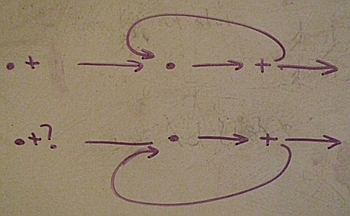 Upper diagram - '.+' - one or more characters, greedy match. Lower diagram - '.+?' - one or more characters, sparse match Upper diagram - '.+' - one or more characters, greedy match. Lower diagram - '.+?' - one or more characters, sparse match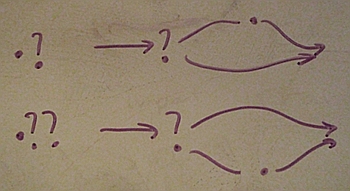 Upper diagram - '.?' - zero or one characters, greedy match. Lower diagram - '.??' - zero or one characters, sparse match Upper diagram - '.?' - zero or one characters, greedy match. Lower diagram - '.??' - zero or one characters, sparse match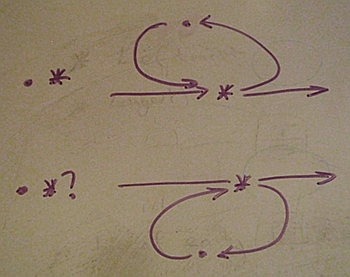 Upper diagram - '.*' - zero or more characters, greedy match. Lower diagram - '.*?' - zero or more characters, sparse match Upper diagram - '.*' - zero or more characters, greedy match. Lower diagram - '.*?' - zero or more characters, sparse matchSparse and Greedy matching is covered in more detail [here] and there's a source code demonstration of the difference that it makes [here]. (written 2010-12-17) Associated topics are indexed as below, or enter http://melksh.am/nnnn for individual articles Q804 - Object Orientation and General technical topics - Regular Expression Internals[1480] Next course - 7th January 2008, Regular Expressions - (2007-12-21) [2727] Making a Lua program run more than 10 times faster - (2010-04-16) [2806] Macho matching - do not do it! - (2010-06-13) [3090] Matching to a string - what if it matches in many possible ways? - (2010-12-17)
Some other Articles
The Christmas Season has arrivedSetting your user_agent in PHP - telling back servers who you are How many toilet rolls - hotel inventory and useage wxPython geometry - BoxSizer example How do regular expressions work / Regular Expression diagrams Python regular expressions - repeating, splitting, lookahead and lookbehind Melksham - two many councils? Making the most of critical emails - reading behind the scene Sizers (geometry control) in a wxPython GUI - a first example |
4759 posts, page by page
Link to page ... 1, 2, 3, 4, 5, 6, 7, 8, 9, 10, 11, 12, 13, 14, 15, 16, 17, 18, 19, 20, 21, 22, 23, 24, 25, 26, 27, 28, 29, 30, 31, 32, 33, 34, 35, 36, 37, 38, 39, 40, 41, 42, 43, 44, 45, 46, 47, 48, 49, 50, 51, 52, 53, 54, 55, 56, 57, 58, 59, 60, 61, 62, 63, 64, 65, 66, 67, 68, 69, 70, 71, 72, 73, 74, 75, 76, 77, 78, 79, 80, 81, 82, 83, 84, 85, 86, 87, 88, 89, 90, 91, 92, 93, 94, 95, 96 at 50 posts per pageThis is a page archived from The Horse's Mouth at http://www.wellho.net/horse/ - the diary and writings of Graham Ellis. Every attempt was made to provide current information at the time the page was written, but things do move forward in our business - new software releases, price changes, new techniques. Please check back via our main site for current courses, prices, versions, etc - any mention of a price in "The Horse's Mouth" cannot be taken as an offer to supply at that price.
Link to Ezine home page (for reading).
Link to Blogging home page (to add comments).
PH: 01144 1225 708225 • EMAIL: info@wellho.net • WEB: http://www.wellho.net • SKYPE: wellho
PAGE: http://www.wellho.net/mouth/3091_How ... grams.html • PAGE BUILT: Sun Oct 11 16:07:41 2020 • BUILD SYSTEM: JelliaJamb