
|
Training, Open Source Programming Languages |
| Home | Accessibility | Courses | The Mouth | Resources | Site Map | About Us | Contact |
| For 2023 (and 2024 ...) - we are now fully retired from IT training. We have made many, many friends over 25 years of teaching about Python, Tcl, Perl, PHP, Lua, Java, C and C++ - and MySQL, Linux and Solaris/SunOS too. Our training notes are now very much out of date, but due to upward compatability most of our examples remain operational and even relevant ad you are welcome to make us if them "as seen" and at your own risk. Lisa and I (Graham) now live in what was our training centre in Melksham - happy to meet with former delegates here - but do check ahead before coming round. We are far from inactive - rather, enjoying the times that we are retired but still healthy enough in mind and body to be active! I am also active in many other area and still look after a lot of web sites - you can find an index ((here)) |
|
Tcl/Tk - updating your display while tasks are running
Let me make two statements: 1. When you are popping up a new window from your program, the very last thing you want to see happen is for the window to gradually appear, with bits of it being resized as it comes on the screen - not only is such an operation irritating on the eye, but also it's burning up a lot of processor time in working and re-working the display which slows the whole operation down. 2. When you press on a button within a window, you're looking for near-instant feedback - gratification that the button press has indeed been accepted, and if your press starts a longer operation running on the computer, you're also hoping - I'm sure - to receive feedback while the job is happening. Maybe a progress bar, a moving graph, or something like that. These two requirements are opposites. In Tcl/Tk, the screen is automatically updated just before the Tcl/Tk application goes into an event wait loop - in other words, the windows will pop up / be updated just prior to the point at which user input is once again accepted. This is very efficient in terms of display (as you would expect from a system that was written years ago, when computers were much less powerful) and usually pleasing on the eye. On that small proportion of occasions that you want to have your display dynamically updated, you can add an update idletasks command into your Tcl/Tk code at appropriate times. This command causes all queued screen updates to be performed, even if the user is not about to be prompted for further input straight thereafter. Here's an example of what I mean. Initial display: 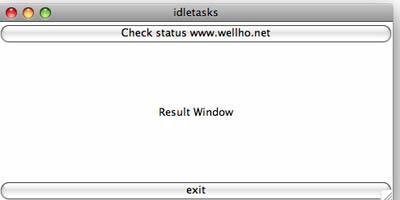 When I click on the "check status" button it runs a ping test three times, at intervals of one second, to test out the connection. If and only if I use update idletasks, the following will be displayed while this ping test is going on:  and when the task has completed, you'll get a full report (in all cases, as the screen is automatically updated prior to being available for further user inputs)  Here's a snippet of code - the proc that's run when the "check status" button is pressed. Full code on our web site here proc pingit {} {You may have guessed that I just completed a public Tk course - inspiration to write up in more details and for "Joe Public" many of the issues that we cover on the course. GUI design - topics like fill and expand, sticky news, canvas scaling and update idletasks are perfect to teach and learn in the classroom, but are very hard to pick up from the books. Our Tk course is always a very effective one and students leave having really gained a huge amount that would be so hard to appreciate fully through self-study! (written 2007-12-16) Associated topics are indexed as below, or enter http://melksh.am/nnnn for individual articles T242 - Tcl/Tk - More on Expect[435] Expect for Windows - (2005-09-04) [1173] Cheat Sheet / Check list for Expect maintainers - (2007-05-02) [1411] Buffering of inputs to expect, and match order - (2007-10-27) [1531] Expecting a item from a list of possibles - (2008-02-04) [2475] Quick easy and dangerous - automated logins via Tcl / Expect - (2009-10-24) [3009] Expect in Perl - a short explanation and a practical example - (2010-10-22) [3448] Checking all the systems on a subnet, using Expect and Tk - (2011-09-18) T223 - Tcl/Tk - Textish Widgets [596] The magic of -textvariable - (2006-02-08) T221 - Tcl/Tk - Menus G998 - Well House Consultants - Newsletter Highlighted Box [1011] Well House Manor and Beechfield House, Hotels, Melksham - (2006-12-29) [1068] ls -l report, Linux / Unix - types and permssions - (2007-02-06) [1132] Well House Manor, Melksham, Art Gallery - (2007-04-02) [1237] What proportion of our web traffic is robots? - (2007-06-19) [1307] Troy, up state New York - (2007-08-17) [1375] Python v Ruby - (2007-10-02) [1521] Evening drive across the roof of Wiltshire - (2008-01-27) [1621] Linux and Java Course in London - (2008-04-24) [1629] A short introduction to our courses - (2008-05-03) [1751] Public Training Course Dates until July 2009 - (2008-08-13) [1843] How many cups of coffee? - (2008-10-17) [1967] LinkedIn - Thrice Asked, and joined. - (2008-12-30) [2050] Why the Pony Tail? - (2009-02-21) [2125] We have lost a regular business guest - (2009-04-10) [2222] A (biased?) comparison of PHP courses in the UK - (2009-06-07) [2385] Reading all our recent news from a single source - (2009-08-29) [2400] Are you wanting to learn PHP? - (2009-09-08) [2520] Global and Enable - two misused words! - (2009-11-30) [3168] Web Sites - Subject to Advertising Standards from 1st March - check your sites - (2011-02-13)
Some other Articles
FSB leaves its members feeling like mushroomsSome new C programming examples - files, structs, unions etc Decisions - small ones, or big ones? Shopping for Christmas and looking forward Tcl/Tk - updating your display while tasks are running Using Tcl/Tk resource files for flexible applications Making a variable dynamically visible in a Tcl/Tk GUI The Horse goes on and on Cliff Lift simulator- Lynton to Lynmouth - in Tcl/Tk fill and expand on Tcl/Tk pack command |
4759 posts, page by page
Link to page ... 1, 2, 3, 4, 5, 6, 7, 8, 9, 10, 11, 12, 13, 14, 15, 16, 17, 18, 19, 20, 21, 22, 23, 24, 25, 26, 27, 28, 29, 30, 31, 32, 33, 34, 35, 36, 37, 38, 39, 40, 41, 42, 43, 44, 45, 46, 47, 48, 49, 50, 51, 52, 53, 54, 55, 56, 57, 58, 59, 60, 61, 62, 63, 64, 65, 66, 67, 68, 69, 70, 71, 72, 73, 74, 75, 76, 77, 78, 79, 80, 81, 82, 83, 84, 85, 86, 87, 88, 89, 90, 91, 92, 93, 94, 95, 96 at 50 posts per pageThis is a page archived from The Horse's Mouth at http://www.wellho.net/horse/ - the diary and writings of Graham Ellis. Every attempt was made to provide current information at the time the page was written, but things do move forward in our business - new software releases, price changes, new techniques. Please check back via our main site for current courses, prices, versions, etc - any mention of a price in "The Horse's Mouth" cannot be taken as an offer to supply at that price.
Link to Ezine home page (for reading).
Link to Blogging home page (to add comments).
PH: 01144 1225 708225 • EMAIL: info@wellho.net • WEB: http://www.wellho.net • SKYPE: wellho
PAGE: http://www.wellho.net/mouth/1475_Tcl ... nning.html • PAGE BUILT: Sun Oct 11 16:07:41 2020 • BUILD SYSTEM: JelliaJamb